代码先锋网 代码片段及技术文章聚合
Angular10教程--2.6 NgTemplateOutlet指令
技术标签: JavaScript angular教程 angular
NgTemplateOutlet指令
前面我们有写过一个
dialog组件,其中有一个功能点我们是没有实现的,那就是不能传入自定义组件内容。写过vue的兄弟些肯定了解<slot>这个标签,这一节,我们了解下NgTemplateOutlet结构指令,可以实现类似<slot>的功能。(原文阅读)
需求分析:
-
创建一个子组件,并且有默认内容
-
父组件能够传入自定义内容
-
父组件能够访问子组件内部变量
ngTemplateOutlet
ngTemplateOutlet是一个结构型指令,能够将一个提前备好的 TemplateRef插入到页面指定位置。
创建tpl-outlet组件:
ng g c components/tpl-outlet -s
引用组件:
<!-- app.component.html -->
<app-tpl-outlet></app-tpl-outlet>
修改组件:
<!-- tpl-outlet.component.html -->
<div class="outlet">
  <h2>NgTemplateOutlet</h2>
  <div class="content">
    <!-- 使用ngTemplateOutlet绑定模板 -->
    <ng-container [ngTemplateOutlet]="defaultTpl"></ng-container>
  </div>
</div>
<ng-template #defaultTpl>
  <p>组件默认内容</p>
</ng-template>
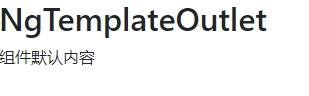
页面表现:
想要组件能够引用外部传入的内容,首先应该定义一个输入属性来接收:
// tpl-outlet.component.ts
import { Component, Input, OnInit, TemplateRef } from '@angular/core';
...
export class TplOutletComponent implements OnInit {
  // 定义一个叫render的输入属性,并且接收TemplateRef类型的值
  @Input() render: TemplateRef<any>;
  //...
}
修改模板,接收变量:
<!-- tpl-outlet.component.html -->
<div class="outlet">
  <h2>NgTemplateOutlet</h2>
  <div class="content">
    <!-- 渲染内容为render的值或者默认内容 -->
    <ng-container [ngTemplateOutlet]="render || render"></ng-container>
  </div>
</div>
<ng-template #defaultTpl>
  <p>组件默认内容</p>
</ng-template>
父组件传入自定义内容:
<!-- app.component.html -->
<app-tpl-outlet [render]="outTpl"></app-tpl-outlet>

<ng-template #outTpl>
  <p>外部传入模板内容</p>
</ng-template>
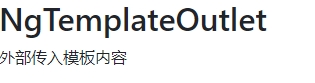
页面表现:
ngTemplateOutletContext
ngTemplateOutletContext是一个对象,该对象的key可在模板中使用let语句进行绑定。可以通过设置ngTemplateOutletContext来给EmbeddedViewRef(也就是我们这儿的<ng-container>)附加一个上下文对象。
组件定义变量:
// tpl-outlet.component.ts
...
export class TplOutletComponent implements OnInit {
  // 随便定义的一个对象
  // $implicit是一个可以被默认识别的key值
  ctx = {$implicit: 'default', value: 'context value'}
  //...
}
模板绑定ngTemplateOutletContext:
<!-- tpl-outlet.component.html -->
<div class="outlet">
  <h2>NgTemplateOutlet</h2>
  <div class="content">
    <ng-container [ngTemplateOutlet]="render || render" [ngTemplateOutletContext]="ctx"></ng-container>
  </div>
</div>
...
父组件使用:
<!-- app.component.html -->
<app-tpl-outlet [render]="outTpl"></app-tpl-outlet>

<ng-template #outTpl let-key let-val="value">
  <p>外部传入模板内容 --- 组件内部传过来的变量默认值:{{key}}, value:{{val}}</p>
</ng-template>
页面表现:

因为ctx.$implicit是内部默认识别的一个值,所以在let的时候不用赋值
同时,在子组件自己的模板上也一样能够访问内部变量:
<ng-template #defaultTpl let-key let-val="value">
  <p>组件默认内容 --- 默认值:{{key}},value:{{val}}</p>
</ng-template>
简写
既然是个结构型指令,那引用变量方式也可以这样:
<ng-container *ngTemplateOutlet="render || defaultTpl; context: ctx"></ng-container>
并且,将指令使用在<ng-template>上也是可以的:
<ng-template *ngTemplateOutlet="render || defaultTpl; context: ctx"></ng-template>
总结
-
ngTemplateOutlet是一个结构型指令,接收一个TemplateRef类型的值; -
使用
ngTemplateOutletContext能够传递组件内部变量,简写直接使用context
欢迎关注我的公众号,公众号将第一时间更新angular教程:

智能推荐
Angular入门到精通系列教程(10)- 指令(Directive)
Angular入门到精通系列教程(10)- 指Angular入门到精通系列教程(10)- 指令(Directive) 摘要 组件与指令之间的关系 2.1. 指令的种类 Angular 中指令的用途 指令举例 4.1. 指令功能 4.2. Anuglar CLI生成基本文件 4.3. Directive指令核心代码 4.4. 使用该指令 总结 环境: Angular CLI: 11.0.6 Angu...
Angular入门到精通系列教程(10)- 指令(Directive)
文章目录 1. 摘要 2. 组件与指令之间的关系 2.1. 指令的种类 3. Angular 中指令的用途 4. 指令举例 4.1. 指令功能 4.2. Anuglar CLI生成基本文件 4.3. Directive指令核心代码 4.4. 使用该指令 5. 总结 环境: Angular CLI: 11.0.6 Angular: 11.0.7 Node: 12.18.3 npm : 6.14.6 ...
Angular10教程--2.1 模版表达式与属性绑定
这一节,我们主要讲angular的模版表达式,以及属性、class、style、事件的绑定~ 原文阅读 插值与模板表达式 所谓 “插值” ,就是指将表达式嵌入到标记文本中。 默认情况下,插值会用双花括号 {{ }}作为分隔符。(跟vue一致) 可以有如下几种情况: 当使用模板表达式时,请遵循下列指南: 最好是简单的运算,以便代码能够迅速执行; 不能使用那些具有或可能引发副作...
Angular10 文件流下载
Angular10 文件流下载 downFile.service.ts downloadFile.component.ts 废话我就不说了,直接上代码 downFile.service.ts downloadFile.component.ts this.msg.success和this.msg.loading我用的是NG-ZORRO 下载的文件格式需要确定 上面的例子下载的是pdf格式,如果是其他...
ng-template, ng-container and ngTemplateOutlet - 全方位剖析 Angular 模板
ng-template, ng-container and ngTemplateOutlet - 全方位剖析 Angular 模板 在这篇文章中, 我们将会深入介绍一些 Angular Core 的高级功能! 你可能已经通过一些angular core 的指令间接的使用过 ng-template 了,例如 ngIf/else, ngSwitch. ng-template 和 ngTemplateO...
猜你喜欢
Angular10 中class和style的绑定
Angular10中class和style的绑定 1.class绑定 绑定类型 语法 输入类型 输入值范例 单个类绑定 [class.foo]=‘flag’ boolean|undefined|null true,false 多个类绑定 [class]=‘classExpr’ string {[key:string]:boolean | undefi...
Angular10修改默认端口号
Angular10如何修改默认端口号 1.网上很多帖子说让你去找 就成功了。...
从零搭建Angular10项目
Angular中文官网:https://angular.cn/guide/quickstart 本博客旨在介绍在本地开发环境中使用 Angular CLI 工具来构建并运行一个简单的 Angular 应用 先决条件 在开始之前,请确保你的开发环境已经包含了 Node.js® 和 npm 包管理器。 Node.js Angular 需要 Node.js 的 8.x 或 10.x 版本。 要想...
Angular10 路由取参两种方式
1、单纯取参数值 2、函数方式...