代码先锋网 代码片段及技术文章聚合
C++ Windows编程实现贪吃蛇(可用Dev C++实现)
技术标签: C++ Windows编程 消息机制 绘制 多线程
最近学习Windows编程,试着自己做了个简单的贪吃蛇游戏。不到300行代码,把Windows消息机制,绘制方法,多线程等知识都用上了,适合初学者入门。效果图如下:
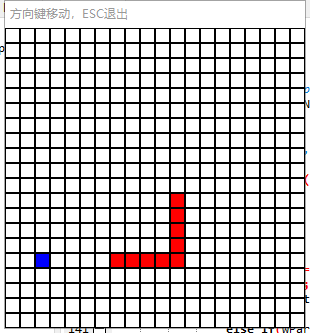
完整代码附注释:
#include <windows.h>
#include <stdio.h>
#include <vector>
#include<cstdlib>
#include<ctime>

#define SIZE 20    //指定游戏地图大小为20*20
#define WIDTH 15    //指定每个格子的大小
#define FPS 10    //每秒刷新多少次
#define SPEED 3    //每刷新多少次蛇移动一格

HWND m_hwnd;//窗口句柄,唯一标示游戏窗口
int g_nWidth = WIDTH*SIZE+10, g_nHeight = WIDTH*SIZE+33;//指定窗口大小
int map[SIZE][SIZE];//地图数组,值为0表示空,1表示蛇身,2表示苹果
std::vector<int> x,y;//用于保存蛇身体每一个部位的位置
int ax,ay;//苹果的位置
int px,py;//最后一次蛇经过的位置,用于吃过苹果后加长蛇身
int dir;//表明当前方向
unsigned long long tk;//游戏ticket数,即已经过多少逻辑帧
bool lock;//操作锁,防止一次刷新操作两次

void init(){//初始化参数
	srand((unsigned)time(NULL));
	tk = 0;
	dir = 2;
	x.push_back(0);
	y.push_back(0);
	px = py = 0;
	ax = -1;
	memset(map,0,sizeof(map));
	map[0][0] = 1;
	lock = false;
}

void gameover(){//输了时调用
	MessageBox(m_hwnd,"你输了","游戏结束",MB_OK);//弹窗
	x.clear();//重新初始化
	y.clear();
	init();
}

void youwin(){//赢了时调用
	MessageBox(m_hwnd,"你赢了","游戏结束",MB_OK);
	x.clear();
	y.clear();
	init();
}

void move(int d){//调用次函数以移动
	if(d == 0&&x[0]>0){//当移动方向为上并且移动合法时,保存并去掉蛇尾,加一格蛇头
		x.insert(x.begin(),x[0]-1);
		px = x[x.size()-1];
		x.erase(x.begin()+x.size()-1);
		y.insert(y.begin(),y[0]);
		py = y[y.size()-1];
		y.erase(y.begin()+y.size()-1);
	}
	else if(d == 0&&x[0]<=0)gameover();//当移动不合法时游戏结束
	else if(d == 2&&x[0]<SIZE-1){
		x.insert(x.begin(),x[0]+1);
		px = x[x.size()-1];
		x.erase(x.begin()+x.size()-1);
		y.insert(y.begin(),y[0]);
		py = y[y.size()-1];
		y.erase(y.begin()+y.size()-1);
	}
	else if(d == 2&&x[0]>=SIZE-1)gameover();
	else if(d == 1&&y[0]>0){
		x.insert(x.begin(),x[0]);
		px = x[x.size()-1];
		x.erase(x.begin()+x.size()-1);
		y.insert(y.begin(),y[0]-1);
		py = y[y.size()-1];
		y.erase(y.begin()+y.size()-1);
	}
	else if(d == 1&&y[0]<=0)gameover();
	else if(d == 3&&y[0]<SIZE-1){
		x.insert(x.begin(),x[0]);
		px = x[x.size()-1];
		x.erase(x.begin()+x.size()-1);
		y.insert(y.begin(),y[0]+1);
		py = y[y.size()-1];
		y.erase(y.begin()+y.size()-1);
	}
	else if(d == 3&&y[0]>=SIZE-1)gameover();
}

void update(){//游戏更新主逻辑,每帧调用此函数
	if(tk%SPEED==0){//每隔SPEED间隔帧移动一次
		move(dir);
		lock = false;
	}
	if(x[0]==ax&&y[0]==ay){//如果吃到了苹果
		x.push_back(px);//加蛇尾
		y.push_back(py);
		ax = -1;//去掉苹果
	}
	if(x.size()>=SIZE*SIZE){//如果蛇的长度大于等于地图大小,游戏结束
		youwin();
		return;
	}
	memset(map,0,sizeof(map));//刷新地图
	for(int i = 0; i < x.size(); i++){
		if(map[x[i]][y[i]]==0)map[x[i]][y[i]] = 1;//如果没有蛇身阻挡则放置蛇身
		else{//否则游戏结束
			gameover();
			return;
		}
	}
	if(ax==-1){//苹果被吃,刷新苹果
		ax = rand()%SIZE;
		ay = rand()%SIZE;
		while(map[ax][ay]==1){
			ax = rand()%SIZE;
			ay = rand()%SIZE;
		}
	}
	map[ax][ay] = 2;
	tk++;
}

/* 此函数用于处理窗口接受的所有消息 */
LRESULT CALLBACK WndProc(HWND hwnd, UINT Message, WPARAM wParam, LPARAM lParam) {
	switch(Message) {

		/* Upon destruction, tell the main thread to stop */
		case WM_DESTROY: {
			PostQuitMessage(0);
			break;
		}

		case WM_KEYDOWN:{//当收到按键消息
			if(!lock){//且操作锁没有锁上,则改变蛇的移动方向并上锁
				if(wParam == VK_UP&&(dir-0)%2!=0){
					dir = 0;
					lock = true;
				}
				else if(wParam == VK_DOWN&&(dir-2)%2!=0){
					dir = 2;
					lock = true;
				}
				else if(wParam == VK_LEFT&&(dir-1)%2!=0){
					dir = 1;
					lock = true;
				}
				else if(wParam == VK_RIGHT&&(dir-3)%2!=0){
					dir = 3;
					lock = true;
				}
			}
			if(wParam == VK_ESCAPE)PostQuitMessage(0);//如果是ESC键则退出
			break;
		}

		/* All other messages (a lot of them) are processed using default procedures */
		default:
			return DefWindowProc(hwnd, Message, wParam, lParam);
	}
	return 0;
}

void render()//渲染函数,用于绘制游戏图像
{
    HDC hDC = GetDC(m_hwnd);//定义窗口句柄的DC

    HDC memDC = CreateCompatibleDC(0);//定义兼容DC

    HBITMAP bmpBack = CreateCompatibleBitmap(hDC,g_nWidth,g_nHeight);//定义位图画布
    SelectObject(memDC,bmpBack);

    HPEN penBack = CreatePen(PS_SOLID,1,RGB(0,0,0));//定义画笔
    SelectObject(memDC,penBack);

    HBRUSH brushBack = CreateSolidBrush(RGB(255,255,255));//定义背景画刷
    SelectObject(memDC,brushBack);

    RECT rcClient;
    GetClientRect(m_hwnd,&rcClient);
    FillRect(memDC,&rcClient,brushBack);//用背景画刷以矩形填充整个窗口
    HBRUSH brushObj = CreateSolidBrush(RGB(255,0,0));//定义蛇身画刷
    HBRUSH brushApple = CreateSolidBrush(RGB(0,0,255));//定义苹果画刷
    int dw = WIDTH;
    int rows = SIZE;
    int cols = SIZE;
    for (int r=0; r<rows; ++ r){//绘制整个矩阵
        for (int c=0; c<cols; ++c){
            if (map[r][c]==1){
                SelectObject(memDC,brushObj);
            }
            else if(map[r][c] == 2){
            	SelectObject(memDC,brushApple);
			}
            else{
                SelectObject(memDC,brushBack);
            }
            Rectangle(memDC,c*dw,r*dw,(c+1)*dw,(r+1)*dw);
        }
    }

    DeleteObject(brushObj);//释放资源
    BitBlt(hDC,0,0,g_nWidth,g_nHeight,memDC,0,0,SRCCOPY);
    DeleteObject(penBack);
    DeleteObject(brushBack);
    DeleteObject(bmpBack);
    DeleteDC(memDC);
    ReleaseDC(m_hwnd,hDC);
}

DWORD WINAPI startLoop(LPVOID lpParamter){//开始主循环,定义这个函数是为了多线程运行,函数名随意,函数格式一定
    while(1){
		update();
		render();
		Sleep(1000/FPS);
	}
    return 0L;
}

/* windows编程的主函数 */
int WINAPI WinMain(HINSTANCE hInstance, HINSTANCE hPrevInstance, LPSTR lpCmdLine, int nCmdShow) {
	WNDCLASSEX wc; /* A properties struct of our window */
	HWND hwnd; /* A 'HANDLE', hence the H, or a pointer to our window */
	MSG msg; /* A temporary location for all messages */

	/* zero out the struct and set the stuff we want to modify */
	memset(&wc,0,sizeof(wc));
	wc.cbSize		 = sizeof(WNDCLASSEX);
	wc.lpfnWndProc	 = WndProc; /* This is where we will send messages to */
	wc.hInstance	 = hInstance;
	wc.hCursor		 = LoadCursor(NULL, IDC_ARROW);

	/* White, COLOR_WINDOW is just a #define for a system color, try Ctrl+Clicking it */
	wc.hbrBackground = (HBRUSH)(COLOR_WINDOW+1);
	wc.lpszClassName = "WindowClass";
	wc.hIcon		 = LoadIcon(NULL, IDI_APPLICATION); /* Load a standard icon */
	wc.hIconSm		 = LoadIcon(NULL, IDI_APPLICATION); /* use the name "A" to use the project icon */

	if(!RegisterClassEx(&wc)) {
		MessageBox(NULL, "Window Registration Failed!","Error!",MB_ICONEXCLAMATION|MB_OK);
		return 0;
	}

	hwnd = CreateWindowEx(WS_EX_CLIENTEDGE,"WindowClass","·½Ïò¼üÒƶ¯£¬ESCÍ˳ö",WS_VISIBLE|WS_EX_STATICEDGE,
		CW_USEDEFAULT, /* x */
		CW_USEDEFAULT, /* y */
		g_nWidth, /* width */
		g_nHeight, /* height */
		NULL,NULL,hInstance,NULL);

	if(hwnd == NULL) {
		MessageBox(NULL, "Window Creation Failed!","Error!",MB_ICONEXCLAMATION|MB_OK);
		return 0;
	}

	m_hwnd = hwnd;
	init();//初始化

	HANDLE hThread = CreateThread(NULL, 0, startLoop, NULL, 0, NULL);//创建线程
        CloseHandle(hThread);//释放线程句柄

	/*
		This is the heart of our program where all input is processed and
		sent to WndProc. Note that GetMessage blocks code flow until it receives something, so
		this loop will not produce unreasonably high CPU usage
	*/
	while(GetMessage(&msg, NULL, 0, 0) > 0) { /* If no error is received... */
		TranslateMessage(&msg); /* Translate key codes to chars if present */
		DispatchMessage(&msg); /* Send it to WndProc */
	}
	return msg.wParam;
}智能推荐
## C++实现贪吃蛇项目
【问题描述】 1.首先自动生成一个N * N(如20 * 20)的空间,在内部随机生成1个 $ 代表食物,随机生成一条长度为5的蛇,蛇的身体用心形(ASCII码为003)显示,蛇头用笑脸(ASCII码为002)显示。 2.自行定义蛇的起始位置。 3用户随意按键后蛇即刻开始自行行走,可设置行走速率为0.5秒。 3.监测用户按键,根据用户的选择方向键,改变蛇的行走方向。 4.在遇到食物$ 时,长度增一...
C++实现贪吃蛇源码
C++实现贪吃蛇源码...
c++实现贪吃蛇
c++面向对象实现控制台贪吃蛇 学习了c++面向对象方面的知识,闲着无聊写了贪吃蛇,主要由下面几个类组成: MAP类实现地图的渲染 蛇类实现蛇的初始化,渲染,行走,吃食物等行为 *食物类实现食物的初始化及生成 point类实现坐标类 工具函数包括光标移动,控制台设置,随机数生成等 代码: MAP类 Snack类 Food类 工具函数 main函数 总结: c++真好玩 QAQ!...
使用C++实现贪吃蛇
本博客中部分代码并非原创,浅谈对于代码的理解,由于水平所限,在此作为个人回忆整理所用. 原创地址:https://blog.csdn.net/shawn_hou/article/details/27734217 根据以前玩的贪吃蛇游戏,它的核心在于实现动态的蛇:首先为了将蛇动态的描述出来,通过不断的输出,清屏,修改,再输出这样的循环来实现动画...
C++实现贪吃蛇
开发环境 Vs 2015 + EasyX 需求分析 蛇能上下左右移动 蛇能吃食物 能判断蛇的死亡 主要的类 蛇 蛇的长度,每节蛇的坐标,蛇移动的方向; 蛇初始化,移动,改变方向,吃食物,画蛇,蛇是否死亡 食物 食物的坐标,食物是否被吃掉; 初始化食物,新的食物,画食物; 因为蛇吃食物时需要知道食物的坐标,所以需要获得食物坐标的方法; 因为蛇吃食物后需要改变食物是否被吃的状态,所以需要获得食物坐标的...
猜你喜欢
C语言实现贪吃蛇
include <stdio.h> #include <stdlib.h> #include <Windows.h>//windows编程头文件 #include <time.h> #include <conio.h>//控制台输入输出头文件 #ifndef __cplusplus typedef char bool; #define f...
C语言实现贪吃蛇
适合新手的基础版贪吃蛇 <graphics.h>必须得安装easyx,挺简单的,还有官方文档 snake.h snake.cpp apple.h apple.cpp background.h background.cpp brain.h brain.cpp main.cpp...
c语言实现贪吃蛇
...
linux下C实现贪吃蛇
闲着没事,又刚学了AIO,就想试试写个贪吃蛇。 但后来也没时间做修改和优化了。写之前其实也没怎么想好该怎么写,写得蛮丑陋的,随便看看吧。 编译时需要连接curses和rt库,就在连接时加上-lcurses -lrt就好了 main.c文件如下 greedysnack.h 如下 greedysnack.c 文件如下...
C#wpf贪吃蛇实现
分析 1,实现地图,蛇,食物的出现 2,蛇的长度以及蛇头与蛇身的区别 3,食物的随机位置 4,实现开始继续让蛇停止与继续移动 5,蛇吃到食物加分数 6,蛇碰撞到墙壁或者蛇身就会死亡 代码实现...