代码先锋网 代码片段及技术文章聚合
Android WebView开发(四):WebView独立进程解决方案
技术标签: Android WebView webview 独立进程解决方案
一、Android WebView开发(一):基础应用
二、Android WebView开发(二):WebView与Native交互
三、Android WebView开发(三):WebView性能优化
四、Android WebView开发(四):WebView独立进程解决方案
五、Android WebView开发(五):自定义WebView工具栏
附GitHub源码:WebViewExplore
一、WebView面临的问题:
1、WebView导致的内存泄漏问题,及后续引起的OOM问题。
2、Android版本不同,采用了不同的内核,兼容性Crash。
3、WebView代码质量,WebView和Native版本不一致,导致Crash。
二、WebView独立进程的实现:
WebView独立进程的实现比较简单,只需要在AndroidManifest中找到对应的WebViewActivity,对其配置"android: process"属性即可。如下:
  <!--独立进程WebViewActivity-->
  <activity
      android:name=".SingleProcessActivity"
      android:configChanges="orientation|keyboardHidden|screenSize"
      android:process=":remoteWeb" />
我们可以通过 adb shell ps|grep com.hongri.webview 指令查看验证,添加独立进程前后的对进程的打印情况:

可以看到已经在主进程的基础上,新生成了一个remoteWeb独立进程。
有两个进程就必然会涉及到进程间的通信,所以最终涉及到的交互及通信包括:
前端与Native端、独立进程与主进程间的通信。
后面会通过下面的demo逐个介绍,如下图独立进程中的SingleProcessActivity页面加载了一个本地的html前端页面,页面包含两个按钮,点击后分别最终会调用主进程的showToast方法doCalculate方法,从而实现前端及进程间的交互。

1、前端与Native端的交互:
[可参考:二、WebView与Native的交互]
(1)、注册JS映射接口,并实现:
加载本地的一个remote_web.html文件:
public static final String CONTENT_SCHEME = "file:///android_asset/remote/remote_web.html";//允许js交互
webSettings.setJavaScriptEnabled(true);
JsRemoteInterface remoteInterface = new JsRemoteInterface();
remoteInterface.setListener(this);
//注册JS交互接口
mWebView.addJavascriptInterface(remoteInterface, "webview");
mWebView.loadUrl(CONTENT_SCHEME);其中 JsRemoteInterface 为对应的前端交互映射类,源码如下:
/**
 * Create by zhongyao on 2021/12/14
 * Description: 前端交互映射类
 */
public class JsRemoteInterface {

    private static final String TAG = "JsRemoteInterface";
    private final Handler mHandler = new Handler();
    private IRemoteListener listener;

    /**
     * 前端调用方法
     * @param cmd
     * @param param
     */
    @JavascriptInterface
    public void post(final String cmd, final String param) {
        mHandler.post(new Runnable() {
            @Override
            public void run() {
                if (listener != null) {
                    try {
                        listener.post(cmd, param);
                    } catch (RemoteException e) {
                        e.printStackTrace();
                    }
                }
            }
        });
    }

    public void setListener(IRemoteListener remoteListener) {
        listener = remoteListener;
    }
}
(2)、前端关键代码实现:
- remote_web.html:
</script>
<div class="item" style="font-size: 18px; color: #ffffff" onclick="callAppToast()">调用: showToast</div>
<div class="item" style="font-size: 18px; color: #ffffff" onclick="callCalculate()">调用: appCalculate</div>
<script src="remote_web.js" charset="utf-8"></script>
<script>
function callAppToast() {
dj.post("showToast", {message: "this is action from html"});
}
function callCalculate() {
dj.postWithCallback("appCalculate", {firstNum: "1", secondNum: "2"}, function(res) {
dj.post("showToast", {message: JSON.stringify(res)});
});
}
</script>- remote_web.js:
dj.post = function(cmd,para){
    if(dj.os.isIOS){
        var message = {};
        message.meta = {
            cmd:cmd
        };
        message.para = para || {};
        window.webview.post(message);
    }else if(window.dj.os.isAndroid){
        window.webview.post(cmd,JSON.stringify(para));
    }
};
dj.postWithCallback = function(cmd,para,callback,ud){
    var callbackname = dj.callbackname();
    dj.addCallback(callbackname,callback,ud);
    if(dj.os.isIOS){
        var message = {};
        message.meta  = {
            cmd:cmd,
            callback:callbackname
        };
        message.para = para;
        window.webview.post(message);
    }else if(window.dj.os.isAndroid){
        para.callback = callbackname;
        window.webview.post(cmd,JSON.stringify(para));
    }
};
2、独立进程与主进程的交互:
(1)、定义一个AIDL文件 CalculateInterface:
并将暴露给其他进程的方法在该文件中声明,如下图:
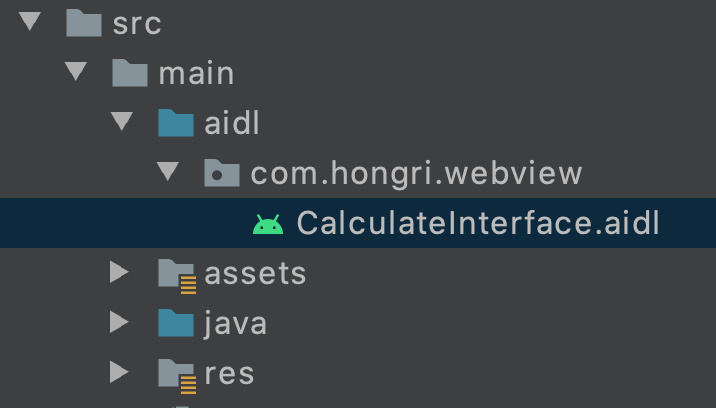
需要注意的是,该文件的包名需要跟java文件夹下的源码的主包名一致。
aidl文件源码如下,定义了上面描述的两个方法:
// CalculateInterface.aidl
package com.hongri.webview;

// Declare any non-default types here with import statements

interface CalculateInterface {
   double doCalculate(double a, double b);
   void showToast();
}
(2)、主进程中定义一个远程服务RemoteService【可看做Server】:
此服务用来监听客户端的连接请求,并实现该AIDL接口,完整代码如下:
/**
 * @author hongri
 * @description 远程Service【Server】
 * 【此Service位于主进程中】
 */
public class RemoteService extends Service {

    private static final String TAG = "RemoteService";

    @Override
    public IBinder onBind(Intent arg0) {
        return mBinder;
    }

    @Override
    public boolean onUnbind(Intent intent) {
        return super.onUnbind(intent);
    }

    @Override
    public void onCreate() {
        super.onCreate();
    }

    @Override
    public int onStartCommand(Intent intent, int flags, int startId) {
        return super.onStartCommand(intent, flags, startId);
    }

    @Override
    public void onDestroy() {
        super.onDestroy();
    }


    private final CalculateInterface.Stub mBinder = new CalculateInterface.Stub() {
        /**
         * remoteWeb进程调用主进程的showToast方法,实现进程间的通信。
         * @throws RemoteException
         */
        @Override
        public void showToast() throws RemoteException {
            Log.d(TAG, "showToast" + " processName:" + ProcessUtil.getProcessName(getApplicationContext()) + " isMainProcess:" + ProcessUtil.isMainProcess(getApplicationContext()));
            Handler handler = new Handler(Looper.getMainLooper());
            handler.post(new Runnable() {
                @Override
                public void run() {
                    Toast.makeText(getApplicationContext(), "remoteWeb进程调用了主进程的showToast方法", Toast.LENGTH_LONG).show();
                }
            });
        }

        /**
         * remoteWeb进程调用主进程的doCalculate方法,实现进程间通信。
         * @param a
         * @param b
         * @return
         * @throws RemoteException
         */
        @Override
        public double doCalculate(double a, double b) throws RemoteException {
            Calculate calculate = new Calculate();
            final double result = calculate.calculateSum(a, b);
            Handler handler = new Handler(Looper.getMainLooper());
            handler.post(new Runnable() {
                @Override
                public void run() {
                    Toast.makeText(getApplicationContext(), "remoteWeb进程调用了主进程的doCalculate方法, 计算结果为:" + result, Toast.LENGTH_LONG).show();
                }
            });
            return result;
        }
    };
}
(3)、在独立进程SingleProcessActivity中绑定远程服务RemoteService:
    /**
     * 绑定远程服务RemoteService
     */
    private void initService() {
        Intent intent = new Intent();
        intent.setComponent(new ComponentName("com.hongri.webview", "com.hongri.webview.service.RemoteService"));
        bindService(intent, mConn, BIND_AUTO_CREATE);
    }
(4)、绑定成功后,将服务端返回的Binder对象(service)转换成AIDL接口所属的类型(CalculateInterface):
    private CalculateInterface mRemoteService;

    private final ServiceConnection mConn = new ServiceConnection() {
        @Override
        public void onServiceConnected(ComponentName name, IBinder service) {
            Log.d(TAG, "onServiceConnected");
            //当Service绑定成功时,通过Binder获取到远程服务代理
            mRemoteService = CalculateInterface.Stub.asInterface(service);
        }

        @Override
        public void onServiceDisconnected(ComponentName name) {
            Log.d(TAG, "onServiceDisconnected");
            mRemoteService = null;
        }
    };
(5)、此时就可以根据前端post方法的调用,来根据 mRemoteService 实例针对性的调用主进程的showToast与doCalculate方法:
    @Override
    public void post(String cmd, String param) throws RemoteException {
        Log.d(TAG, "当前进程name:" + ProcessUtil.getProcessName(this) + " 主进程:" + ProcessUtil.isMainProcess(this));
        dealWithPost(cmd, param);
    }

    /**
     * 前端调用方法处理
     *
     * @param cmd
     * @param param
     * @throws RemoteException
     */
    private void dealWithPost(String cmd, String param) throws RemoteException {
        if (mRemoteService == null) {
            Log.e(TAG, "remote service proxy is null");
            return;
        }
        switch (cmd) {
            case "showToast":
                Log.d(TAG, "showToast");
                mRemoteService.showToast();
                break;
            case "appCalculate":
                Log.d(TAG, "appCalculate --> " + param);
                try {
                    JSONObject jsonObject = new JSONObject(param);
                    double firstNum = Double.parseDouble(jsonObject.optString("firstNum"));
                    double secondNum = Double.parseDouble(jsonObject.optString("secondNum"));
                    double calculateResult = mRemoteService.doCalculate(firstNum, secondNum);
                    Log.d(TAG, "calculateResult:" + calculateResult);
                } catch (JSONException e) {
                    e.printStackTrace();
                }
                break;
            default:
                Log.d(TAG, "Native端暂未实现该方法");
                break;
        }
    }
点击前端页面的doCalculate方法,调用结果如下: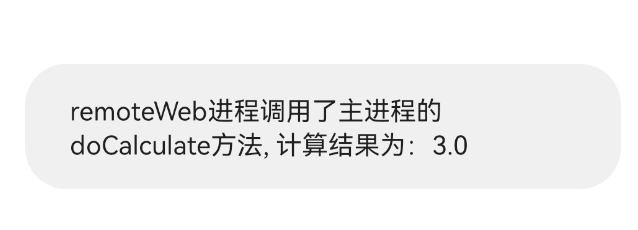
表示最终实现了remoteWeb 独立进程与主进程之间的通信。
附GitHub源码:WebViewExplore
参考:
智能推荐
android webview无法上传文件的解决方案
一、介绍 当我们使用webview内嵌一个网页时,如果we页面中带有<input type="file" ...>的控件,在webview中能正常显示这个上传控件,但是你会发现无论你如何点击都无效果,即无法达到上传图片和文件的效果,也无法打开文件夹.在网页端调动相机的操作也是无效的,下面我们来解决下这些问题 二、解决办法 第一步:重写WebChromeClient ...
13、Android Webview图片自适应屏幕解决方案
图片过大,通过设置webview后字体又超小。 网上的方法千篇一律 尝试过程: 1、设置 字体变得超级小,不是想要的效果 2、效果同上 3、CSS控制,尝试加入代码 使用这种方法 就让webview加载图片自适应屏幕了。 注意:需要对webview 设置: webView.getSettings().setJavaScriptEnabled(true); 下面的方法没使用过不知道是否可以!(备用吧...
Android内Webview上传文件的解决方案
网上大部分的都是兼容android3,android4的 可以参考这个 https://stackoverflow.com/questions/5907369/file-upload-in-webview 在高版本下以上方法是不生效的,可以参考下列代码...
Android WebView上传文件,附件的解决方案
引用:https://cloud.tencent.com/developer/article/1726358 实测有效 我们在开发需求的时候,难免会接入一下第三方的H5页面,有些H5页面是具有上传照片的功能,Android 中的 WebView是不能直接打开文件选择弹框的 接下来我讲简单提供一下解决方案,先说一下思路 1.接收WebView打开文件选择器的通知 2.收到通知后,打开文件选择器等待用...
Android WebView违规获取MAC地址解决方案
一、需求背景 最近app的合规检查特别的严格,app在同意隐私协议之前不允许获取用户的隐私信息,但是很多的隐私合规都是写在H5中的,通过webview打开h5会获取mac地址,所有要想通过合规检查就必须让webview打开h5的时候获取不到mac地址。 二、解决方案 1.方案思路 经过多种的尝试最后想到了解决方案,既然是去获取了MAC地址,必定要调用系统的API,那么只要去HOOK系统的方法在获取...
猜你喜欢
Android WebView 加载https网页白屏,空白解决方案
最近在做一个H5相关的需求,使用WebView加载第三方提供的https网页时显示白屏。但是调试打开Baidu和B站的https网址时就能正常打开。被这个问题困扰了半天。 合作方说是android手机在访问https的网站是会要求有证书验证,通过重写WebViewClient里面的onReceivedSslError方法,去掉super.onReceivedSslError方法,使用handler...
android webview增强版,对原生webview的一些解决方案
MWebView 根据 Tamicer/JsWebView 修改定制 为什么要使用WebView 随着app业务的不断深入发展,只靠着原生代码来堆砌功能是不现实,毕竟开发的时长会增加,而且同时需要开发iOS和Android两套,并且,如果在UI上改变了一丁点,都需要提包(虽然Android现在可以进行热更新,但是热更新不是100%能生效的,其中的原理只要了解过的人都会知道的),最终我们会选择使用原...
Android webView 中使用loadData出现乱码的解决方案 WebView.goBack() 出现空白页面
首先并非全部的手机都出现乱码,试了下小米一加是正常的,oppo vivo是乱码; 最初使用的是mWebView.loadDataWithBaseURL(null, html, "text/html", "utf-8", null);没有出现乱码,但是当点击其中的链接再调用webview的goback()方法,返回的时候将会出现空白页;当使用了mWebView...
Android WebView 文本框获取焦点后自动放大的解决方案
2013-10-14 更新:最近好久没弄android 了,webview的问题其实如果是在android4.0以上的版本,本文说的文本框放大本身是可以通过调整html body的大小来解决的,建议body不写死或者body比webview小。下文所说的办法针对个版本android 都有效,但是实际上使用会很局限,实际上你要先知道html的body大小 和we...